09 · Two rooms, one desk
On the Mac. On the phone. The same sentence.
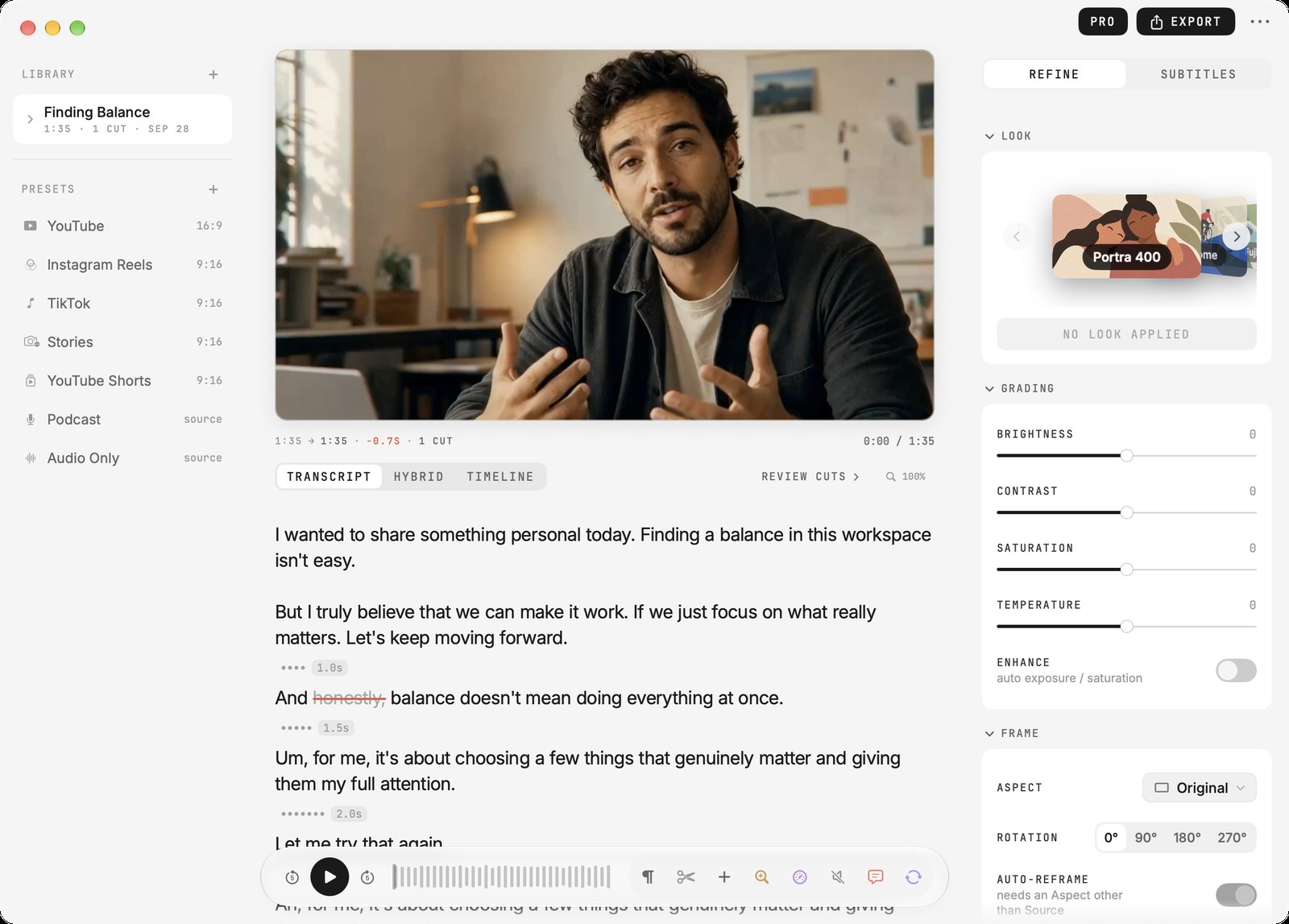
On the Mac the project's takes sit under it in the Library, and one header swaps the words for the hybrid or the timeline. On the phone the same three lenses are a swipe apart.

Cuts · for iPhone and Mac
Cuts turns your take into a page of text. Delete a word and the video loses exactly that, on the iPhone and on the Mac, and nothing leaves the device.
[The usual way]
Blade · Blade · Select · Delete · Close gapFive steps · twelve tracks
[In Cuts]
The take becomes a page. The page is the edit.
01 · The gesture
Tap any word to cut it
02 · Auto
Fillers, retakes and silences are found before you read the page. Each one is struck, not deleted: a tap brings it back.
03 · Play
The read head walks the words that survived. What you read is what you export.
Cuts · for iPhone and Mac
Get it for iPhone Get it for Mac
Free to start · Pro US$ 9.99, once
04 · Every day
A typo in an email. A word the phone got wrong. A line of a song that was not right yet. You fix them without thinking about it. Cuts lets you do the same to a video.
05 · Try it
A real take, with its sound. Tap words to strike them, or let the passes find the ums, the retake and the silences. Then play: the video skips exactly what is struck.
06 · The Editor · New in 2.8
Six styles, each one a whole edit: the pauses, the ums, the zooms, the captions, the look and how every cut feels. One tap applies it, and one Undo takes it all back.
Save your own settings as a style and it sits beside the six. Import a video and the Editor offers its cut as soon as the words land: one tap to take it, or Later. The PRO parts of a style wait for Pro; the rest of it is free.
07 · The crates
Every look, caption and transition is a card in a crate, the way the apps keep them. Scroll to flick through, or tap a crate.
08 · One surface
When you want one, the phone keeps it beside the words: each block of film is as tall as what is said in it, and a cut is the gap between two blocks. Trim it, split it, lay music under it. Or never open it.
09 · Two rooms, one desk
On the Mac the project's takes sit under it in the Library, and one header swaps the words for the hybrid or the timeline. On the phone the same three lenses are a swipe apart.
10 · Stickers
New in 2.8: all fifty redrawn in the same hand as the cards. Each one is anchored to the word it belongs to, on both apps.


11 · Everything else
What the page can do once the cut is made. Every line is a fact you can check in the app, and none of it needs a keyframe.
12 · The register
Transcribed, cut and rendered where it was filmed. Whisper ships inside the app, and the Editor reads the film with Apple Intelligence on the device; on a Mac without it, with a model you choose to download once. No account, no cloud, no analytics.
Works on a plane
13 · Why
Everyone thinks editing is cutting time. We think editing is choosing what matters. The timeline measures the clock. The sentence keeps the intent. You already edit in words. Now your video does too.
I'm a film director. I got tired of the timeline and went back to the sentence, and Cuts is that sentence, made executable.
Brenno Castro · São Paulo
